Rename movies & series,stop doing it one by one.
CineRename automatically identifies your movies, TV shows and anime series, matches official titles, downloads subtitles and organizes your video folders for Plex, Jellyfin and Emby.
How to rename and organize a video library in seconds
From a messy folder to a clean Plex / Jellyfin library — here's how CineRename works
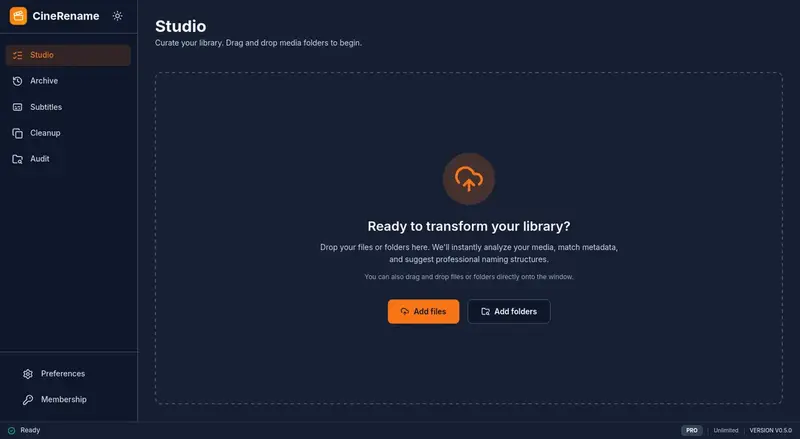
Drop your files
Drag and drop your videos or a whole folder. CineRename can even read inside ZIP / RAR archives.
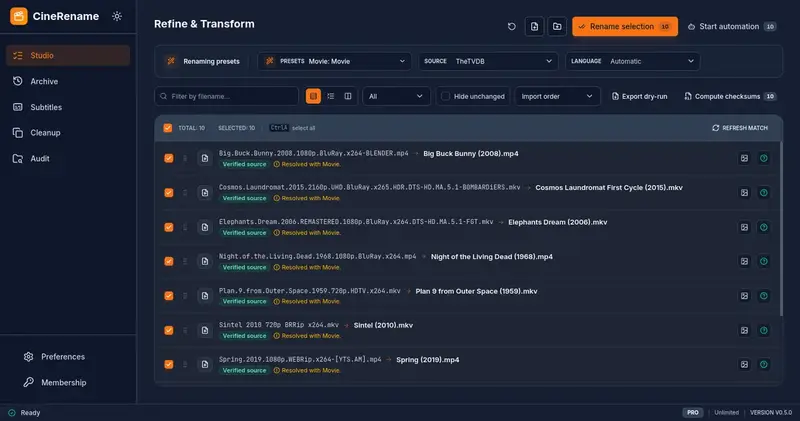
Smart preview
The Studio shows the exact before/after rendering for each file. CineRename searches configured metadata sources and keeps uncertain matches visible.
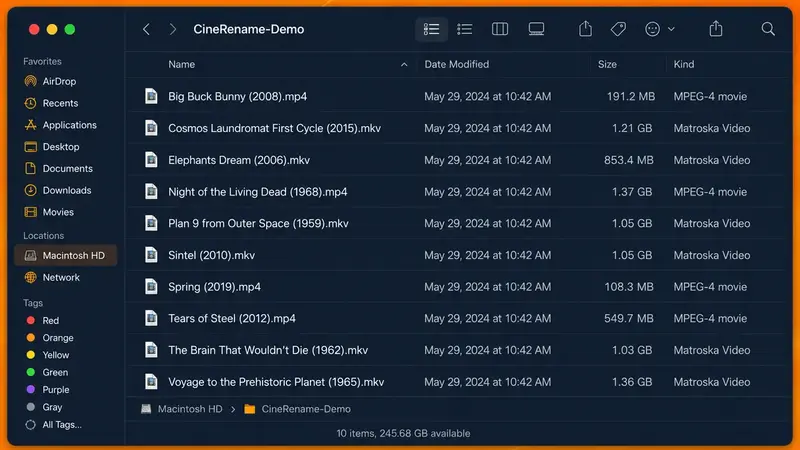
Library ready
Confirm. CineRename renames, downloads subtitles and cleans duplicates. Plex and Jellyfin recognize everything immediately.
Compared to other tools:
With CineRename, you drop your whole folder, analysis runs in parallel, and you get a finished library with subtitles.
With other tools, you rename file by file, no duplicate handling, no subtitle support, no undo.
Features that keep your Plex & Jellyfin library clean.
From drag-and-drop to a flawless Plex catalog, CineRename packs everything that used to waste your time.
Drop anything
Videos, folders, ZIP, RAR, 7z and common archive formats — CineRename handles messy imports without manual sorting.
Smart naming presets
Plex, Jellyfin, Emby, Kodi — one click applies a server-ready convention.
Fine tuning
Name format, preferred languages, accepted qualities — adapt every detail to your workflow.
Automatic pipeline mode
Drop a folder, the app renames, fetches subtitles and moves files to your final library on its own.
CLI, Scheduler & NAS Docker
Script your servers, schedule tasks (cron), or run CineRename in headless mode on your NAS or Docker container.
Your files never leave your machine
No upload, no cloud. Only configured metadata and subtitle providers are contacted.
Rust + Svelte 5 performance
Virtualized lists: stay smooth with thousands of files. Native Rust code for disk operations.
Subtitle matching
Built-in OpenSubtitles module: file fingerprint first, metadata fallback, preview, download and naming.
Duplicate hunter
Automatically detects multi-quality copies (1080p, 4K…), suggests the best version and frees disk space.
Multilingual, multi-format
French, English, Spanish, Chinese — MKV, MP4, AVI, MOV — movies, TV shows, anime: all handled.
Instant before/after preview
The Studio shows the exact rendering of each rename in real time. No surprises.
History and one-click undo
Every change is tracked. Undo any rename, even days later — your library's time machine.
Exportable dry-run reports
Test your renaming rules safely and export the results to CSV/JSON without modifying a single file.
Watch Folders
CineRename listens to your download folders and automatically imports new video files as soon as they appear.
Checksum Verification
Check transfer integrity with native support for .sfv, .md5, and .sha1 files before organizing your library.
Comparison
CineRename vs FileBot
FileBot is an aging tool with an outdated, complex interface. CineRename provides a modern, visual, and intuitive alternative to rename, verify, subtitle, and organize your media library without struggling with scripts.
Modern & visual interface
No more austere 2000s-era text lists. CineRename displays posters, rich metadata, and a live preview.
Safety & 1-click Undo
Never rename blindly again: preview every single change and roll back with one click if anything goes wrong.
All-in-one without scripts
Built-in subtitles, multi-quality duplicate detection, and Plex/Jellyfin presets without writing any code.
| Criteria | CineRename | FileBot |
|---|---|---|
| User Interface | Modern Visual Studio with posters, before/after live preview, and clear verification before changes. | Outdated, austere Java/Swing interface from the 2000s, purely text-driven with no media artwork. |
| Workflow | Fluid, guided workflow: renaming, subtitles, duplicate detection, and 1-click undo in one place. | Rigid and complex workflow, operating blindly with no straightforward way to undo mistakes. |
| Media Matching | Smart multi-source matching (TheTVDB, TVmaze, AniList, Kitsu) with guided conflict resolution. | Old matching engine that often requires tedious manual intervention or custom parameters. |
| Naming Formats | Ready-to-use presets for Plex, Jellyfin, Emby, and Kodi, easily customizable without any coding. | Complicated Groovy scripting syntax, inaccessible for non-technical users and hard to maintain. |
| Subtitles | Built-in OpenSubtitles search, live preview, language selection, format conversion, and time offset tools. | Bare-bones, clunky subtitle handling with no built-in visual preview or timing tools. |
| Duplicate Detection | Multi-quality duplicate analyzer (resolution, codecs, audio tracks, subtitles) with smart recommendations. | No built-in duplicate manager: requires manual sorting or installing third-party utilities. |
| Automation | Native watch folders, modern Rust CLI, scheduler, and seamless background processing. | Heavy reliance on complex AMC command-line scripts that break easily across updates. |
| NAS & Docker | Ultra-lightweight native Rust binary, minimal RAM usage, built-in WebUI, and optimized Docker images. | High memory consumption due to the Java Virtual Machine, heavy to run on entry-level NAS. |
| Pricing | Generous free trial, then affordable Pro license with an accessible lifetime plan. | Expensive subscription or costly lifetime license for an aging app with very few UI improvements. |
Why choose CineRename:
- A modern, fluid interface designed for maximum visual clarity.
- A live preview with artwork and metadata before touching your files.
- Built-in multi-quality duplicate detector and subtitle manager.
- Full history and 1-click undo in case of unexpected changes.
Major FileBot drawbacks:
- A dated Java interface from the 2000s that is austere and frustrating to use.
- Forced to learn complex Groovy scripts for anything beyond basic tasks.
- No visual preview before renaming, creating a high risk of batch mistakes.
- No duplicate cleaner and heavy memory footprint from the Java runtime.
CineRename at a glance
CineRename is the modern media renamer that automatically renames and organizes movies, TV series, anime and subtitles for Plex, Jellyfin, Emby and Kodi libraries. Built in Rust as a fast alternative to FileBot and tinyMediaManager, it processes your files entirely locally with zero upload, previews every change before touching a file, and keeps a one-click undo history. Runs on Windows, macOS, Linux, NAS and Docker. Free tier included, with Pro licenses at €1 per month (1 EUR), €5 per year or €30 for a lifetime license.
- Category
- Media file renamer and library organizer (FileBot alternative)
- Platforms
- Windows 10/11, macOS (Intel and Apple Silicon), Linux (AppImage, .deb, .rpm, Snap), NAS and Docker (headless CLI)
- Metadata sources
- TheTVDB, TVmaze, AniList, Kitsu
- Subtitles
- OpenSubtitles (file fingerprint first, then metadata)
- Media servers
- Plex, Jellyfin, Emby, Kodi
- Privacy
- 100% local processing: your video files stay on your computer and are never uploaded
- Pricing
- Free tier (2 renames and 2 subtitle searches per day). Pro: €1/month, €5/year or €30 lifetime. 14-day money-back guarantee
- App languages
- English, French, Spanish, Simplified Chinese
- Safety & Control
- Live before/after preview and 1-click instant Undo rollback
- Latest version
- 0.5.13
Frequently Asked Questions
CineRename was built from the ground up in Rust to be lightning-fast. Unlike older Java-based tools like FileBot or tinyMediaManager, it handles thousands of files without UI lag. It also includes rare features: native ZIP/RAR extraction, live before/after preview, full 1-click Undo history, and multi-quality duplicate detection (see our full alternatives comparison).
Yes. CineRename supports anime presets with absolute episode numbering or season/episode output, plus OVA and Specials handling. For long shows where platforms disagree on seasons, you can keep absolute numbering and still fetch localized episode titles when available.
No. While we offer a yearly license for updates, we also provide a one-time 'Lifetime' payment option. We hate subscription fatigue as much as you do.
No. CineRename processes your files locally. Network requests only go to configured metadata and subtitle providers, and they contain titles, IDs, language choices, or the OpenSubtitles file fingerprint — never the video file itself.
CineRename gives you the best possible match without promising magic. It uses the OpenSubtitles file fingerprint first, then falls back to title and metadata IDs. You can preview the subtitle before downloading it, and timing tools are available if a release still needs an offset or drift adjustment.
Sonarr and Radarr are powerful for full automation, but they require complex setups with indexers and downloaders. CineRename is a lightweight standalone tool to clean a messy drive or organize files quickly without running a 24/7 server (see our CineRename vs Sonarr comparison).
Yes. CineRename has a lightweight headless CLI, WebUI/TUI modes and Docker packaging. On a server, use the scheduler, cron, or downloader hooks (see installation guide); desktop Watch Folders remain available in the graphical app.
Don't panic! CineRename tracks every operation in its History module. With a single click, you can undo a massive batch rename, and all your files will be restored to their original names and locations.
After purchase, you will immediately receive a license key by email. Simply enter it into the application to unlock the Pro version.
Yes. CineRename is a neutral file management tool. We do not host, provide, sell, or distribute movies, TV shows, anime, or other copyrighted media. The software only helps users organize files they already have the legal right to use.
Why cinephiles adopt CineRename
Trusted by data hoarders and NAS admins worldwide
Switched from FileBot because of the Java memory bloat and UI lag. CineRename running on Rust is just instantaneous. The CLI handles my Sonarr post-processing like a champ.

Dave M. • Data Hoarder
The absolute numbering support for Anime is a godsend. It's the only renamer that didn't butcher my 900+ episode One Piece collection. Jellyfin recognized everything on the first scan.

Sarah T. • Anime Fan
Finally a modern UI! Most renamers look like they were built in 2005. The interactive before/after preview studio is incredibly intuitive. I know exactly what will happen before touching the disk.

Mike B. • UI Designer
A bug, an idea, a question?
CineRename is actively developed. Don't hesitate to reach out to report a bug, suggest a feature or ask a question.
Contact Support
For licensing, billing, or private inquiries, send us an email directly.
Send an EmailStill hesitating?
You spend several hours per month renaming and looking for subtitles.
With CineRename, that time disappears.
What's your evening worth?
Get your evenings back: watch your movies instead of sorting them.